| Home |
| PC stuff twitch Twitch and disc mod help Cables Software |
|
A work in progress but here you will find tips and tricks for your PC, streams and even some audio things. Over time this corner will grow but for now I'm just gonna pile everything om this page. (I regret this already but oh well) Couple of Stream commands for twitch. These are built into twitch chat and use / instead of ! "/raid user" and "/shoutout user" Theres many more aswell. Typing "/" will display a list of them PC tips First one is for screen flickering and driving you crazy CTRL + windows +shift + B will reset your GPU While we're on this topic, if you're finding your screen to be really heavily tinted to one color open settings and search screen calibration. you can use your GPU to correct your annoying tinted screen Second Got your fancy powerful computer but it's sluggish and takes soo long to boot? Right click taskbar and go open Task manager and click on startup. Hot key for TM is also short cut CTRL + Shift + Esc What we're gonna do is turn off auto start for non essential things like Steam and xbox. This is a big one I want to mention cause theres handful of useless programs out there that do the exact thing. No sense using a third party software to do what the first party software does. Screen shot here from my old main studio/gaming rig. Both USB audio drivers are for my audio interfaces, I can turn on the software anytime through Start menu WHEN I need it. 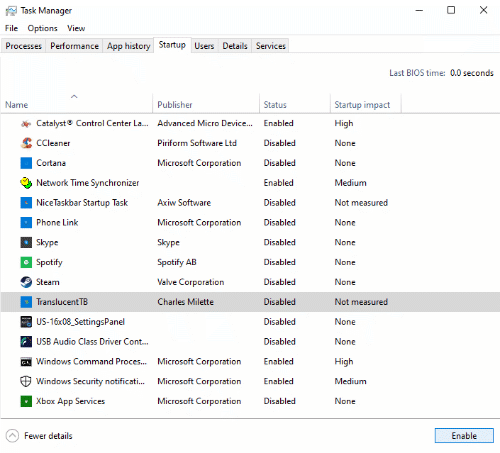 I am highly against unnessesarry need for a third party program to do whats built into windows. Cool keyboard tricks windows icon + 1-9 will open whatever program you have in 1-9. Alt+ will cycle through them and Windows + tab will bring up al windows in desktop veiw In your browser you can change tabs using CTRL + 1-9 Tak shared some common ones aswell "I suppose I should contribute to the tech stuffs, basic universal hotkeys applicable in 90% of softwares" Cntrl + S = Save Cntrl + A = Select All Cntrl + C = Copy Cntrl + V = Paste Cntrl + Z = Undo "Implementing these into your work flow will save you a significant amount of time in the long run �" We can't forget these ones tho CTRL + X = cut CTRL + Shift + Z =redo Figured I'd start a twitch bot command section Stream elements - !command add/edit/delete !commandName whatever you want Nightbot - !commands add/edit/delete !commandName whatever you want streamlabs is much different tho using !addcommand !commandName Whatever you want and to edit a command we do !editcommand !command whatever and then finally !removecommand !commandName to remove That one always throws me. Recently the subject of veiwing knowing when your ad breaks are coming up in OBS. Firstly we need to go to our stream manager in twitch and add our ads manager to a dock. After that we pop it up and copy the link. Then we go over to our OBS and docks -> custom browser docks. Give it a name and add the link then finally sign in again and put your new dock where you want it. Here is a video I found showing it Thank you to Tiffachu and Raggy for bringing this one to my mind again. Drop them a follow on twitch and show them some love. Till next time. |
| Cubeyard mapoftheinternet.com | ©2022-2023 Nok Universe | JD LaRose |